|
The SDK docs have moved to https://dev.palmsens.com/sdk. If you aren't automatically redirected please follow this link. |

With this SDK, you can control your PalmSens instrument and process the data in MATLAB. Connect, control and process data from your PalmSens instrument using MATLAB.
|
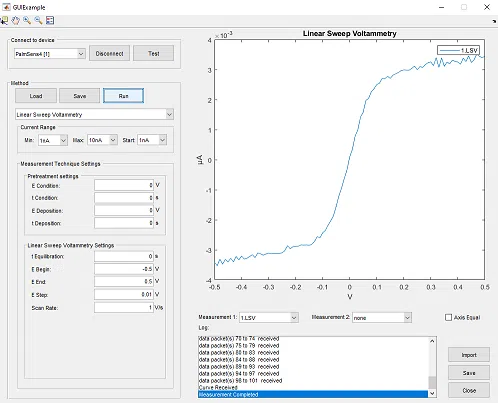
Control your PalmSens instrument using MATLAB Connect to your PalmSens instrument, receive data and plot the results, with a graphical user interface in MATLAB. After selecting the electrochemical technique to use, you can adjust the parameters and start a measurement. |
Import experimental results from PSTrace directly into MATLAB You can import your saved data from PSTrace in MATLAB directly. Use the PSTrace software to set-up and run your experiments with PalmSens instruments and use MATLAB for your advanced data analyses. |
|

|
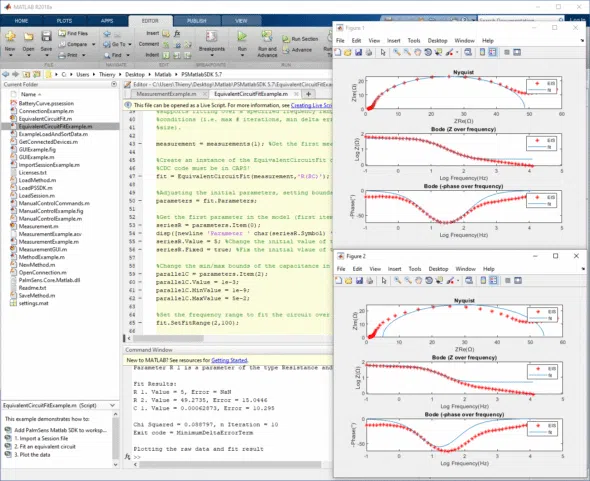
Plot results in Nyquist and Bode plot You can plot the results of your electrochemical experiment in a Nyquist and Bode plot to analyze the impedance of your electrochemical setup |
Getting Started
-
.NET Framework 4.7.2
-
Drivers included with PSTrace 5, MultiTrace 4, PSTrace Xpress or the driver installer.
Download the latest release here. Unzip the file and load the directory 'matlab-x.y.z' in Matlab.
Compatible devices and firmware
The PalmSens SDK is based on PalmSens core version 5.12. The table below lists the minimum supported firmwares versions and required drivers.
It is not necessary to install any additional drivers on your Android and iOS devices.
You can update the firmware using a recent version of PSTrace on a Windows PC See the chapter 'Updating firmware' in the PSTrace user manual for more information.
| Instrument | Firmware version | Windows drivers |
|---|---|---|
Nexus |
1.100 |
palmsens_cdc.inf (optional) [1] |
Palmsens1 |
4.4 |
PalmSens FTDI [1] |
Palmsens2 |
4.4 |
PalmSens FTDI [1] |
Palmsens3 |
2.8 |
PalmSens FTDI [1] |
Palmsens4 |
1.7 |
palmsens_cdc.inf (optional) [1] |
MultiPalmsens4 |
1.7 |
Generic FTDI [2] |
EmStat1 |
3.7 |
PalmSens FTDI [1] |
EmStat2 |
7.7 |
PalmSens FTDI [1] |
EmStat3 |
7.7 |
PalmSens FTDI [1] |
EmStat3+ |
7.7 |
PalmSens FTDI [1] |
MultiEmStat3 |
7.7 |
PalmSens FTDI [1] |
EmStat3 Blue |
7.7 |
PalmSens FTDI [1] |
EmStat3+ Blue |
7.7 |
PalmSens FTDI [1] |
EmStat3 Go |
7.7 |
PalmSens FTDI [1] |
EmStat3+ Go |
7.7 |
PalmSens FTDI [1] |
EmStat4S |
1.307 |
palmsens_cdc.inf (optional) [1] |
MultiEmStat4 |
1.307 |
palmsens_cdc.inf (optional) [1] |
EmStat4X |
1.307 |
palmsens_winusb.inf (optional) [1] |
EmStat4R |
1.307 |
Generic FTDI [2] |
EmStat4M |
1.307 |
palmsens_cdc.inf (optional) [1] |
EmStat4T |
1.406 |
palmsens_cdc.inf (optional) [1] |
EmStat4 Go |
1.307 |
Generic FTDI [2] |
EmStat Pico DevBoard |
1.601 |
Generic FTDI (optional) [2] |
EmStat Pico Module |
1.601 |
Generic FTDI (optional) [2] |
EmStat Pico Go |
1.601 |
Generic FTDI (optional) [2] |
Sensit Smart |
1.601 |
Generic FTDI (optional) [2] |
Sensit BT |
1.601 |
Generic FTDI (optional) [2] |
Sensit Wearable |
1.600 |
Generic FTDI (optional) [2] |