|
The SDK docs have moved to https://dev.palmsens.com/sdk. If you aren't automatically redirected please follow this link. |

With this SDK, you can control your PalmSens instrument and process the data in Labview. Connect, control and process data from your PalmSens instrument using Labview.
Download the latest release here.
See the installation guidelines for more information.
Overview
The PalmSens SDK contains the following .NET libraries and LabVIEW classes, controls and Vis in the PalmSens folder:
- Libraries Folder
-
Contains all the necessary .NET libraries. Labview directly interfaces with the classes and functions defined in these libraries.
- PalmSens LabVIEW class
-
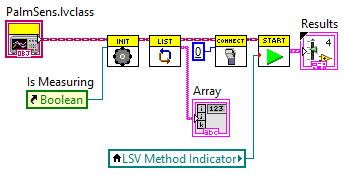
This class implements the basic features required to use PalmSens instruments in LabVIEW.
-
Initialise: Initialises the class and .NET libraries. -
Dispose: Frees up memory used by .NET libraries. -
ListInstruments: Returns an array of the available instruments. -
Connect: Connects to the specified instrument. -
Disconnect: Disconnects from the connected instrument. -
Measure: Performs a measurement. -
AbortMeasurement: Aborts the current measurement
-
MeasurementResultsandLiveCurveResultscontrols-
Type definitions for the in and outputs of the Measure function.
- Event Callback Vis
-
VIs used by the Measure function to receive data from .NET events.