|
The SDK docs have moved to https://dev.palmsens.com/sdk. If you aren't automatically redirected please follow this link. |
Installation
This page takes you through setting up the SDK for your LabVIEW project.
Requirements
-
-
The code was developed with Community Version 2025
-
For compatibility with older versions (down to 2019), use .
-
-
.NET Framework 4.7.2
-
Drivers included with PSTrace 5, MultiTrace 4, PSTrace Xpress or the driver installer.
Download the latest release here. Unzip the file and load the project file in Labview.
Adding the PalmSens folder
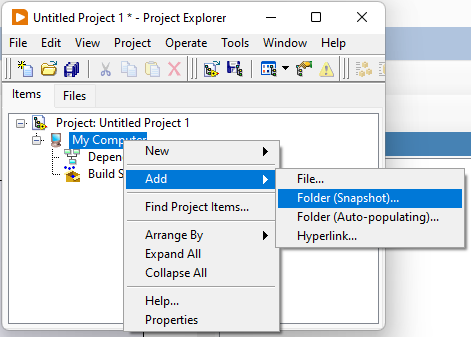
To add the SDK to a new or existing LabVIEW project add the PalmSens folder. In the Project Explorer, right click on the . Both the Folder (Snapshot) and Folder (Auto-populating) options will work.
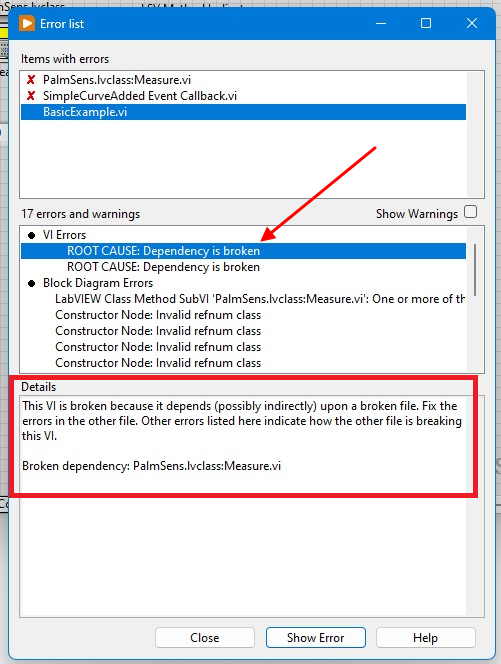
Broken dependency error when using the SDK
When you download the SDK and extract its contents Windows blocks the required .NET library .dll files. Executing anything in the SDK that uses these libraries produces an error like this.
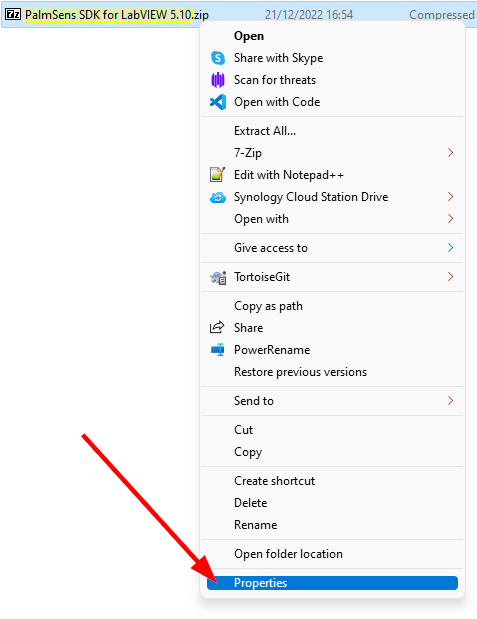
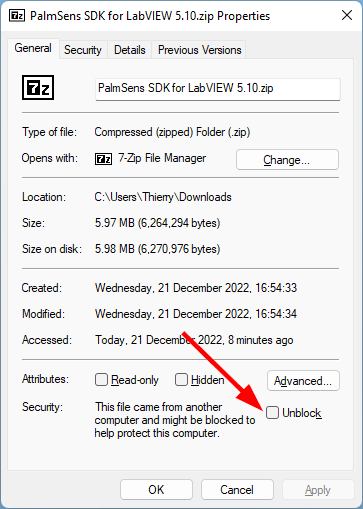
To prevent this error you will need to manually unblock the PalmSens SDK for LabVIEW.zip file before unpacking its contents. To do this go to . Then click on the Unblock checkbox and click on OK.
|
|
If this does not resolve the issue you may need to do this for each file in the PalmSens\Libraries subfolder.
Compatible devices and firmware
The PalmSens SDK is based on PalmSens core version 5.12.
The table below lists the minimum supported firmwares versions and required drivers.
You can update the firmware using a recent version of PSTrace on a Windows PC See the chapter 'Updating firmware' in the PSTrace user manual for more information.
| Instrument | Firmware version | Windows drivers |
|---|---|---|
Nexus |
1.100 |
palmsens_cdc.inf (optional) [1] |
Palmsens1 |
4.4 |
PalmSens FTDI [1] |
Palmsens2 |
4.4 |
PalmSens FTDI [1] |
Palmsens3 |
2.8 |
PalmSens FTDI [1] |
Palmsens4 |
1.7 |
palmsens_cdc.inf (optional) [1] |
MultiPalmsens4 |
1.7 |
Generic FTDI [2] |
EmStat1 |
3.7 |
PalmSens FTDI [1] |
EmStat2 |
7.7 |
PalmSens FTDI [1] |
EmStat3 |
7.7 |
PalmSens FTDI [1] |
EmStat3+ |
7.7 |
PalmSens FTDI [1] |
MultiEmStat3 |
7.7 |
PalmSens FTDI [1] |
EmStat3 Blue |
7.7 |
PalmSens FTDI [1] |
EmStat3+ Blue |
7.7 |
PalmSens FTDI [1] |
EmStat3 Go |
7.7 |
PalmSens FTDI [1] |
EmStat3+ Go |
7.7 |
PalmSens FTDI [1] |
EmStat4S |
1.307 |
palmsens_cdc.inf (optional) [1] |
MultiEmStat4 |
1.307 |
palmsens_cdc.inf (optional) [1] |
EmStat4X |
1.307 |
palmsens_winusb.inf (optional) [1] |
EmStat4R |
1.307 |
Generic FTDI [2] |
EmStat4M |
1.307 |
palmsens_cdc.inf (optional) [1] |
EmStat4T |
1.406 |
palmsens_cdc.inf (optional) [1] |
EmStat4 Go |
1.307 |
Generic FTDI [2] |
EmStat Pico DevBoard |
1.601 |
Generic FTDI (optional) [2] |
EmStat Pico Module |
1.601 |
Generic FTDI (optional) [2] |
EmStat Pico Go |
1.601 |
Generic FTDI (optional) [2] |
Sensit Smart |
1.601 |
Generic FTDI (optional) [2] |
Sensit BT |
1.601 |
Generic FTDI (optional) [2] |
Sensit Wearable |
1.600 |
Generic FTDI (optional) [2] |