|
The SDK docs have moved to https://dev.palmsens.com/sdk. If you aren't automatically redirected please follow this link. |
MethodSCRIPT™
The MethodSCRIPT™ scripting language is designed to integrate PalmSens OEM potentiostat (modules) effortlessly in your hardware setup or product.
MethodSCRIPT™ allows developers to program a human-readable script directly into the potentiostat module by means of a serial (TTL) connection. The simple script language allows for running all supported electrochemical techniques and makes it easy to combine different measurements and other tasks.
More script features include:
-
Use of variables
-
(Nested) loops
-
Logging results to an SD card
-
Digital I/O for example for waiting for an external trigger
-
Reading auxiliary values like pH or temperature
-
Going to sleep or hibernate mode
See for more information: www.palmsens.com/methodscript
Sandbox Measurements
PSTrace includes an option to make use MethodSCRIPT™ Sandbox to write and run scripts.
This is a great place to test MethodSCRIPT™ measurements to see what the result would be.
That script can then be used in the MethodScriptSandbox technique in the SDK as demonstrated below.
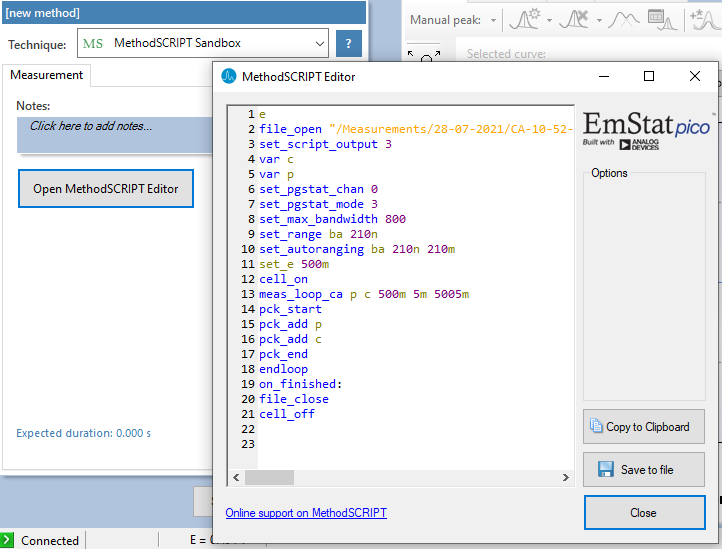
The following example contains 2 measurements, a LSV (meas_loop_lsv) and a CV (meas_loop_cv).
Custom MethodSCRIPT™ can be run using the MethodScriptSandbox Method class.
var methodSCRIPT = @"e
var c
var p
set_pgstat_chan 1
set_pgstat_mode 0
set_pgstat_chan 0
set_pgstat_mode 3
set_max_bandwidth 400
set_range_minmax da -1 1
set_range ba 590u
set_autoranging ba 590n 590u
cell_on
meas_loop_lsv p c -500m 500m 10m 1
pck_start
pck_add p
pck_add c
pck_end
endloop
meas_loop_cv p c -500m -1 1 10m 1
pck_start
pck_add p
pck_add c
pck_end
endloop
on_finished:
cell_off
".Replace("\r", ""); (1)

var sandbox = new MethodScriptSandbox {
    MethodScript = methodSCRIPT
};
| 1 | Remove all carriage return characters |
MethodSCRIPT™ allows multiple measurements with a single script without having to send multiple scripts.
The script string text must not contain the default newline characters (\r\n), these need to be replace just with the line feed or new line character (\n).
MethodSCRIPT™ must be run on the appropriate devices.
You can check if a device is capable of running method script by casting the capabilities to MethodScriptDeviceCapabilities.
psCommSimple.Capabilities is MethodScriptDeviceCapabilities
SandboxMeasurements parse and store the variables sent in pcks. Curves are generated automatically for each meas_loop that defines a pck with two or more variables, scripts with multiple meas_loops will generate multiple curves. The first variable in the pck will be set as the x-axis and a curve is created for each subsequent variable in the pck. Please note that to plot data versus time you will need to a variable with the time to the pck.
Getter/Setter
The getter/setter allows you to control the IO pins of the devices that allow this, for example with the EmStat PICO.
Getter Example:
byte bitMask = 0b10101010; (1)

var result = psCommSimple.ReadDigitalLine(bitMask); (2)

var result = await psCommSimple.ReadDigitalLineAsync(bitMask); (3)
| 1 | A bitmask specifying which digital lines to read (0 = ignore, 1 = read). |
| 2 | Synchronous |
| 3 | Asynchronous |
Setter Example:
byte bitMask = 0b11111111; (1)

var configGPIO = 0b10101010; (2)

psCommSimple.SetDigitalOutput(bitMask, configGPIO); (3)

await psCommSimple.SetDigitalOutputAsync(bitMask, configGPIO); (4)
| 1 | A bitmask specifying the output signal of the digital lines (0 = low, 1 = high). |
| 2 | A bitmask specifying the the mode of digital lines (0 = input, 1 = output). |
| 3 | Synchronous |
| 4 | Asynchronous |
Setter example using MethodSCRIPT™:
string script = @"e
set_gpio_cfg 0b11111111 1
set_gpio 0b10101010i
".Replace("\r", "");;

psCommSimple.StartSetterMethodScript(script); (1)

await psCommSimple.StartSetterMethodScriptAsync(script); (2)
| 1 | Synchronous |
| 2 | Asynchronous |
Getter example using MethodSCRIPT™:
string script = @"e
var p
set_gpio_cfg 0b11111111 0
get_gpio p
pck_start
pck_add p
pck_end
".Replace("\r", "");;

var result = psCommSimple.StartGetterMethodScript(script); (1)

var result = await psCommSimple.StartGetterMethodScriptAsync(script); (2)
| 1 | Synchronous |
| 2 | Asynchronous |