|
The SDK docs have moved to https://dev.palmsens.com/sdk. If you aren't automatically redirected please follow this link. |
Working with files
As of version 5 of the PalmSens SDK and PSTrace, measurements and their
corresponding methods are stored in .pssession files. Methods can be
stored separately in .psmethod files.
The PalmSens SDK is backward compatible with following filetypes:
| File | vs potential (scan method) | Measurement vs time |
|---|---|---|
Method |
|
|
Method (before 2012) |
|
|
Data (single curve) |
|
|
Analysis curves |
|
|
Multiplexer curves |
|
Loading a method file
To use the following examples, make sure the PalmSens.Core.Simplified.csproj is referenced in your project.
Add these namespaces at the top of the document.
using PalmSens;
using PalmSens.Core.Simplified.WinForms;
This method loads a .psmethod file from the specified file path (i.e. C:\path\to\my_method.psmethod).
Method method = SimpleLoadSaveFunctions.LoadMethod(filepath);Setting up a method
The next example defines a Linear Sweep Voltammetry method.
Add these namespaces at the top of the document.
using PalmSens;
using PalmSens.Techniques;
Instantiate a new Linear Sweep Voltammetry method.
LinearSweep lsv = new LinearSweep() {
    BeginPotential = -1f,
    EndPotential = 1f,
    StepPotential = 0.01f,
    Scanrate = 1f,
};
Define the current range settings.
lsv.Ranging.StartCurrentRange = new CurrentRange(CurrentRanges.cr1uA);
lsv.Ranging.MaximumCurrentRange = new CurrentRange(CurrentRanges.cr10uA);
lsv.Ranging.MaximumCurrentRange = new CurrentRange(CurrentRanges.cr100pA);
The CurrentRange constructor uses the enum PalmSens.CurrentRanges to specify its range.
Saving a method
To save the Linear Sweep Voltammetry method with the parameters as defined in the previous example, the following examples can be used:
Add these namespaces at the top of the document.
using PalmSens;
using PalmSens.Core.Simplified.WinForms;
This saves the previously defined Linear Sweep Voltammetry method
(lsv) to a .psmethod file specified in the file path (i.e. C:\path\to\my_method.psmethod`).
SimpleLoadSaveFunctions.SaveMethod(lsv, filepath);Loading and saving data
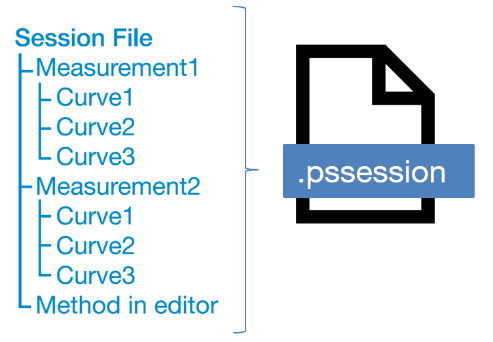
Data from measurements can be loaded from and stored to .pssession files.
This contains a session with one or more measurements containing its respective method and curves.
Data from measurements can be loaded from and stored to .pssession files.
This contains a session with one or more measurements containing its respective method and curves.
The simplified wrapper uses the SimpleMeasurement and SimpleCurve classes from the PalmSens.Core.Simplified.Data namespace instead of the PalmSens.Measurement, PalmSens.Plottables.Curve and PalmSens.Plottables.EISData classes.
The SimpleMeasurement and SimpleCurve classes make it easier to perform basic functions such as:
-
Creating a curve with different units from a measurement (e.g. a curve with charge over time)
-
Finding peaks in a curve
-
Determining the moving average baseline of a curve
-
Performing basic operations on a curve (addition, subtraction, multiplication, log10, differentiation, integration)
Add these namespaces at the top of the document.
using PalmSens;
using PalmSens.Core.Simplified.Data;
This saves a SimpleMeasurement to a .pssession file specified in the file path (i.e. C:\path\to\my_data.pssession).
SimpleLoadSaveFunctions.SaveMeasurement(lsv, filepath);Loading data from internal storage
See also: Internal storage example.
When connected to a PalmSens4, EmStat4, Sensit BT or EmStat Pico Development Board you can list and retrieve the measurements stored on its internal storage.
The documentation on Connecting explains how to connect to a device and create an instance of a CommManager.
This line will return the root folder of the device’s internal storage.
using PalmSens;
using PalmSens.Data;
using PalmSens.Core.Simplified.InternalStorage;

IInternalStorageFolder folder = psCommSimple.GetInternalStorageBrowser().GetRoot();
The IInternalStorageFolder interface allows you to list subfolders and any files (measurements) located in that folder.
IReadOnlyList<IInternalStorageFolder> subFolders = folder.GetSubFolders();
IReadOnlyList<IInternalStorageFile> files = folder.GetFiles();
To load a measurement from a IInternalStorageFile use the GetMeasurement method.
SimpleMeasurement measurement = files[0].GetMeasurement();For a practical application, please refer to the Internal storage example.