|
The SDK docs have moved to https://dev.palmsens.com/sdk. If you aren't automatically redirected please follow this link. |
Getting Started
Download the latest release from here.
Developing native, cross-platform .NET Multi-platform App UI (.NET MAUI) apps requires Visual Studio 2022 17.12 or greater, or the latest Visual Studio Code with the .NET MAUI extension.
See this page for installation instructions and how to get started with MAUI.
Add SDK project to your solution
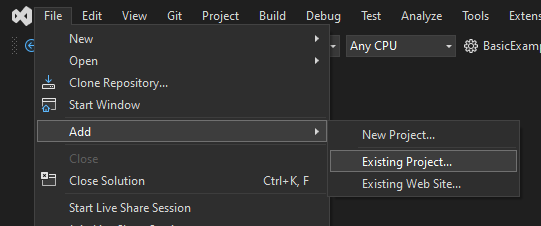
In Visual Studio, click on your solution and go to .
Navigate to the project (.csproj) you want to add, e.g. PSLibraries/PalmSens.Core.Simplified.Maui/PalmSens.Core.Simplified.MAUI.csproj.
Add SDK references to the project
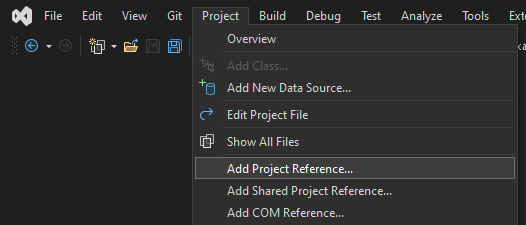
In Visual Studio, click on your project and go to .
Select the reference(s) you want to add, e.g. PalmSens.Core.Simplified.MAUI.
Reference external libraries (.dll files) by selecting them via the
'Browse' button and reference project files (.csproj) by xref#add-sdk-to-solution[adding them
to your solution] and referencing the project.
If you use the simplified wrapper to control your devices, reference the PalmSens.Core.Simplified.csproj and PalmSens.Core.Simplified.MAUI.csproj should be referenced.
To use the plot helpers, reference the SDKPlot.csproj, SDKPlot.Maui.csproj projects.
The PalmSens.Core libraries are available from nuget.org.
The PalmSens.Core libraries are referenced by the Simplified wrapper, and do not need to be referenced explicitly.
You can use net9.0 as the target .NET runtime.
Compatible devices and firmware
The PalmSens SDK is based on PalmSens core version 5.12.
The table below lists the minimum supported firmwares versions and required drivers.
It is not necessary to install any additional drivers on your Android and iOS devices.
You can update the firmware using a recent version of PSTrace on a Windows PC See the chapter 'Updating firmware' in the PSTrace user manual for more information.
| Instrument | Firmware version | Windows drivers |
|---|---|---|
Nexus |
1.100 |
palmsens_cdc.inf (optional) [1] |
Palmsens1 |
4.4 |
PalmSens FTDI [1] |
Palmsens2 |
4.4 |
PalmSens FTDI [1] |
Palmsens3 |
2.8 |
PalmSens FTDI [1] |
Palmsens4 |
1.7 |
palmsens_cdc.inf (optional) [1] |
MultiPalmsens4 |
1.7 |
Generic FTDI [2] |
EmStat1 |
3.7 |
PalmSens FTDI [1] |
EmStat2 |
7.7 |
PalmSens FTDI [1] |
EmStat3 |
7.7 |
PalmSens FTDI [1] |
EmStat3+ |
7.7 |
PalmSens FTDI [1] |
MultiEmStat3 |
7.7 |
PalmSens FTDI [1] |
EmStat3 Blue |
7.7 |
PalmSens FTDI [1] |
EmStat3+ Blue |
7.7 |
PalmSens FTDI [1] |
EmStat3 Go |
7.7 |
PalmSens FTDI [1] |
EmStat3+ Go |
7.7 |
PalmSens FTDI [1] |
EmStat4S |
1.307 |
palmsens_cdc.inf (optional) [1] |
MultiEmStat4 |
1.307 |
palmsens_cdc.inf (optional) [1] |
EmStat4X |
1.307 |
palmsens_winusb.inf (optional) [1] |
EmStat4R |
1.307 |
Generic FTDI [2] |
EmStat4M |
1.307 |
palmsens_cdc.inf (optional) [1] |
EmStat4T |
1.406 |
palmsens_cdc.inf (optional) [1] |
EmStat4 Go |
1.307 |
Generic FTDI [2] |
EmStat Pico DevBoard |
1.601 |
Generic FTDI (optional) [2] |
EmStat Pico Module |
1.601 |
Generic FTDI (optional) [2] |
EmStat Pico Go |
1.601 |
Generic FTDI (optional) [2] |
Sensit Smart |
1.601 |
Generic FTDI (optional) [2] |
Sensit BT |
1.601 |
Generic FTDI (optional) [2] |
Sensit Wearable |
1.600 |
Generic FTDI (optional) [2] |